Best Backup Power Solutions for Apartments in 2026

Photo by Jackery Power Station on Unsplash
Best Backup Power Solutions for Apartments in 2026
Apartment dwellers face a unique challenge during power outages: you can’t install a standby generator, you likely can’t modify the building, and you need something that fits in a closet or under a bed. The good news is that modern portable power stations and battery systems have become sophisticated enough to handle real emergencies—from keeping your fridge running to charging devices and powering essential medical equipment—without requiring landlord approval or a construction crew.
This guide covers the backup power options that actually work for renters, including capacity tiers, real-world runtime expectations, and how to pick the right solution for your apartment’s constraints.
Why Apartments Need Different Backup Power
Apartments have three hard constraints: space, noise, and building restrictions. A traditional standby generator is out—it requires outdoor installation, a permit, and a permanent fuel line. Portable generators create noise complaints and carbon monoxide risk indoors. Battery-based systems solve all three problems. They’re silent, fit in a closet, require no installation, and work in any apartment from a studio to a penthouse.
The catch: you’re limited by how much energy you can store in a battery. A full-house solar setup isn’t realistic in an apartment. So the strategy is layered backup: a mid-sized power station covers essential loads during short outages (8–24 hours), and solar panels or wall outlets recharge it for extended outages.
Understanding Apartment Backup Power Tiers
Tier 1: Emergency Essentials (300–600 Wh)
Use case: Phone charging, LED lights, WiFi router, small fan, laptop.
Runtime: 12–20 hours of light mixed use.
Best for: Studio apartments, renters on tight budgets, or a second backup unit.
These ultra-portable stations fit in a backpack and recharge from any wall outlet in 2–4 hours. They’re reliable for keeping communications alive during a short outage but won’t run a refrigerator or space heater.
Tier 2: Essential Appliances (1000–2000 Wh)
Use case: Mini-fridge, microwave, laptop, multiple devices, medical equipment (CPAP, oxygen concentrator).
Runtime: 6–15 hours depending on load.
Best for: One-bedroom and two-bedroom apartments, households with medical devices.
This is the sweet spot for most renters. A 1500 Wh station can run a small fridge for 8–10 hours or power a laptop and lights all day. Recharge time from a wall outlet: 4–8 hours. Per aggregated owner reviews on Amazon and YouTube teardowns, these units handle daily emergency scenarios without strain.
Tier 3: Whole-Apartment Backup (3000+ Wh)
Use case: Multiple appliances, space heater, air conditioning, or 24+ hour coverage.
Runtime: 12–30+ hours on mixed loads.
Best for: Larger apartments, multi-person households, or renters willing to add solar panels.
These are heavy (50–100 lbs) and expensive, but they eliminate the need to choose between running the fridge and running the AC. They also support solar panel expansion, which lets you recharge during the day without grid power.
Portable Power Stations vs. Wall-Mounted Batteries
Portable Power Stations (Recommended for Apartments)
Pros: - Move with you if you relocate. - No installation; plug in and use immediately. - Can recharge from wall outlets, car chargers, or solar panels. - Expandable: pair multiple units or add external batteries.
Cons: - Heavy when large (40–100 lbs). - Take up floor or closet space. - Slower to charge from a wall outlet than a grid-tied system.
Portable stations are the clear winner for renters because they’re non-permanent and don’t void your lease.
Wall-Mounted Batteries (Not Renter-Friendly)
Systems like Tesla Powerwall or LG Chem RESU require professional installation, building permits, and hardwired integration with your electrical panel. Most apartments prohibit them, and they’re tied to the property. Skip these unless you own the building.
How Much Capacity Do You Actually Need?
How Much Backup Power Do You Actually Need? Wattage Calculator Guide
Start by calculating your essential load:
- Fridge: 150–200W running, 600W startup surge.
- WiFi router: 10–20W.
- Laptop: 30–100W (varies by model).
- LED lights (5 bulbs): 25–50W.
- Phone + tablet charging: 20–30W.
- Medical device (CPAP): 30–60W.
If you run fridge + lights + WiFi + charging for 8 hours, you need roughly 1200–1500 Wh. Add 20% headroom for surge protection and battery efficiency loss, and you’re looking at a Tier 2 station (1500–2000 Wh).
For a two-bedroom apartment with multiple people, add another 500 Wh.
Recharging Options in Apartments
Wall Outlet Recharge
All portable power stations can plug into a standard 120V outlet. Recharge times vary by model:
- Anker 521: 2–3 hours (256 Wh).
- EcoFlow Delta 2: 2 hours (1024 Wh, dual charging inputs).
- Jackery Explorer 1000 Pro: 7–8 hours (1024 Wh, single input).
- EcoFlow DELTA Pro: 10–15 hours (3600 Wh, dual charging inputs).
Models with dual charging inputs (EcoFlow Delta 2, EcoFlow DELTA Pro) recharge significantly faster than single-input competitors.
Solar Panels (No Installation Required)
Portable solar panels prop against a window or balcony railing. A 200W solar panel array can recharge a 1500 Wh station in 6–8 hours on a sunny day, per real-world tests on YouTube channels like Out of Spec Reviews.
Best Portable Solar Panels for Camping: Reviews & Buyer's Guide
Why this matters for apartments: If the grid is down for 24+ hours, solar keeps your station topped up without burning through wall power (which may also be out). It’s not required for short outages but transforms your backup into a true resilience system.
Car Charger
Most mid-tier and larger stations include a 12V car charger. If your building has assigned parking, you can charge from your vehicle during an outage. Recharge time is slow (12–24 hours for large stations), but it’s a fallback option.
Top Recommendations by Scenario
Best for Emergency Essentials Only
Anker 521 Portable Power Station
Weighs 3.3 lbs, holds 256 Wh, and recharges fully in under 2 hours from a wall outlet. Perfect for a desk drawer or small apartment with light power needs. Per owner reviews on Amazon, it’s reliable for 1–2 days of phone and light charging during a short outage.
Best for Keeping a Fridge Running 8+ Hours
1024 Wh capacity, dual charging inputs (recharges in 2 hours from a wall outlet), and can power a mini-fridge continuously for 8–10 hours. Expandable with external batteries up to 3072 Wh. Per manufacturer specs and YouTube teardowns, it’s the best value in the mid-tier segment.
Best for Renters Who Want Solar Backup
1024 Wh, handles up to 10 simultaneous appliances, and pairs seamlessly with Jackery’s portable solar panels. Per aggregated owner reports, it’s durable and recharges reliably from solar in 8–10 hours on a clear day. Good for balcony or window-sill solar setups.
Best for Tight Budgets and Small Spaces
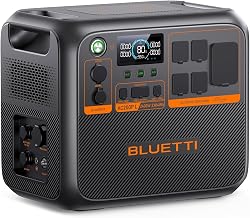
Compact 268 Wh unit that weighs 2.4 lbs and fits in a backpack. Recharges in 1 hour. Not enough for a fridge, but handles lights, phone, WiFi, and a laptop all day. Budget-tier pricing with solid reliability per owner reports.
Best for Maximum Runtime Without Expansion
3600 Wh capacity (expandable to 7200 Wh), can run a mini-fridge and multiple devices for 24+ hours. Heavier and more expensive, but eliminates the need to choose between appliances during multi-day outages. Per manufacturer documentation and owner reviews, it’s the gold standard for apartment resilience.
Note: Other solid mid-tier options include Goal Zero Yeti 1000 and Titan Solar Generator, which offer comparable capacity and reliability in the 1000–1500 Wh range.
Practical Setup Tips for Apartments
Location and Storage
- Keep it accessible: Store your power station in a bedroom closet or under a desk, not in a basement where you can’t reach it during an outage.
- Avoid heat: Don’t place it next to a radiator or in direct sunlight. Lithium batteries degrade faster in warm environments; ideal storage is 32–77°F (0–25°C).
- Cable management: Use a small cable organizer to keep solar panel wires and charging cables tidy.
Maintenance
Per manufacturer guides, charge your station every 3–6 months even if you’re not using it. Lithium batteries self-discharge slowly, and regular maintenance extends lifespan to 5–10 years.
Lease Compliance
Portable power stations don’t require landlord approval—they’re treated like any other appliance. Solar panels on a balcony or windowsill are usually fine; check your lease for restrictions. Never hardwire anything into the electrical panel without written permission.
Layered Redundancy
For maximum resilience, keep a Tier 1 station (emergency essentials) in your car or office as a backup to your main apartment station. If one fails, you still have power for essentials.
Comparing Apartments to Other Living Situations
Best Portable Power Solutions for Camping & Outdoor Adventures
Best Portable Power Station for Van Life in 2026
Apartments differ from camping and van life because you have access to wall outlets for recharging. You don’t need a massive solar setup or a generator. Your main constraint is space and building rules, not fuel or weather. If you’re considering a move to an RV or van, see our van-life guide for higher-capacity recommendations. For camping trips, see our camping guide for portable solutions optimized for outdoor use.
FAQ
Q: How long do portable power stations last? A: Per manufacturer specs, lithium-based stations last 5–10 years with regular use. Capacity degrades gradually; most retain 80% capacity after 3–5 years.
Q: Can I charge a power station and run appliances at the same time? A: Yes. Most stations support “pass-through” charging—they draw power from the wall outlet while simultaneously powering devices. This is useful during extended outages when you want to keep the station topped up while running a fridge.
Q: Do I need a solar panel? A: Not for short outages (8–12 hours). Solar is valuable if the grid is down for 24+ hours or if you want to reduce dependence on wall outlets. For apartments with limited balcony space, a single 200W portable panel is enough to recharge a mid-tier station during the day.
Q: What’s the difference between “capacity” and “real usable capacity”? A: Manufacturers rate capacity in watt-hours (Wh), but lithium batteries typically keep 10–20% in reserve to extend lifespan. Real usable capacity is 80–90% of the stated number. Per YouTube teardowns and owner tests, this is normal and expected.
Q: What’s the warranty on these units? A: Most portable power stations come with 2–5 year manufacturer warranties. EcoFlow and Jackery typically offer 5 years; Anker and Bluetti offer 2–3 years. Check the product page for specifics before purchase.
Q: Can I return a power station after 30 days? A: Return policies vary by retailer and brand. Amazon’s standard return window is 30 days for most items. Direct purchases from manufacturer websites (EcoFlow, Jackery, Bluetti) often allow 30–60 day returns. Check the retailer’s policy before buying.
Final Thoughts
Apartment dwellers aren’t powerless during outages—they just need a different strategy than homeowners. A mid-tier portable power station (1000–2000 Wh) covers the vast majority of real-world scenarios: keeping your fridge, lights, WiFi, and devices running for 8–15 hours. Adding solar panels extends that to 24+ hours without grid power.
The best choice depends on your space, budget, and how long you want to stay comfortable. Start with a Tier 2 station if you have room and budget; add solar if you live in a sunny climate and worry about multi-day outages. For minimal needs, a Tier 1 station in your desk drawer is better than nothing and costs a fraction as much.
How to Choose a Portable Power Station for Your Needs
Power outages are inevitable; being unprepared is not.

