Best Battery Backup for Power Outages in 2026

Photo by Carl Tronders on Unsplash
Best Battery Backup for Power Outages in 2026
When the grid goes down, you have seconds to minutes before critical systems fail. A battery backup doesn’t wait for fuel delivery or manual startup—it switches on instantly and keeps your lights, refrigerator, medical devices, or internet router running. This guide breaks down the three main battery backup categories, how to size one for your home, and which technology makes sense for your outage risk and budget.
Understanding Battery Backup Types
Battery backups fall into three distinct categories, each solving a different problem:
Uninterruptible Power Supplies (UPS) are designed for instant switchover. They sit between your wall outlet and sensitive equipment, detecting a power loss in milliseconds and shifting to battery power. UPS units are ideal for computers, servers, medical equipment, and internet routers—anything that can’t tolerate even a brief interruption. Most UPS systems run for 5–15 minutes on battery alone, enough time to gracefully shut down equipment or bridge a brief outage. Per manufacturer specs and owner reports, UPS units with pure sine-wave output preserve equipment lifespan better than modified sine-wave models.
Portable Power Stations are self-contained lithium or LiFePO4 batteries with built-in inverters and multiple outlet types (AC, USB, USB-C, DC). They’re designed for flexibility: run them at home during an outage, take them camping, or use them as a mobile power source. Capacity ranges from 300 Wh (enough for phones and lights) to 12+ kWh (enough for a full day of essential home loads).
Whole-Home Battery Systems (like Tesla Powerwall or LiFePO4 stacks) integrate with your home’s electrical panel and can power your entire house during an outage, often paired with solar panels for indefinite resilience. These require professional installation and carry a premium price tag, but they eliminate fuel runs and generator maintenance.
How to Size Your Battery Backup
Before choosing a product, you need to know two numbers: peak wattage and daily energy use.
Peak wattage is the maximum power draw when multiple devices run simultaneously. A refrigerator (150 W average per typical nameplate specs), microwave (1200 W), and two lights (200 W) running at once = 1550 W peak. Your battery backup’s inverter must handle this surge, or it will shut down to protect itself. Most portable power stations list both continuous and peak wattage; buy one with peak capacity at least 20% above your calculated peak to avoid stress shutdowns.
Daily energy use tells you how long your backup will last. Multiply each device’s wattage by its daily runtime in hours. A fridge running 24/7 at 150 W average = 3.6 kWh/day. A laptop 8 hours at 65 W = 0.52 kWh/day. Add these up: that’s your minimum battery capacity. For a 3-day outage, multiply by 3.
Portable Power Stations for Home Outages
Portable power stations bridge the gap between UPS systems and whole-home batteries. They’re fast to deploy, require no installation, and cost far less than a hardwired system.
Mid-tier capacity (1–2 kWh): These run essential loads—fridge, lights, charging, internet router—for 12–24 hours, depending on usage. Anker 757 PowerHouse and 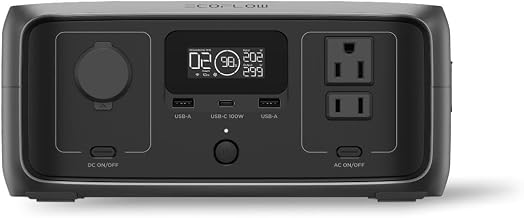
High-capacity (3–6 kWh): These handle whole-house loads for a full day or more. EcoFlow Delta Pro and 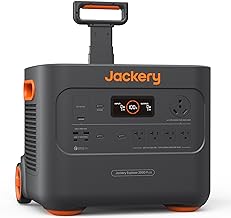
Ultra-high capacity (8+ kWh): These approach whole-home backup territory but remain portable (though heavy—typically 100+ lbs). Intended for multi-day resilience or simultaneous power of multiple circuits. 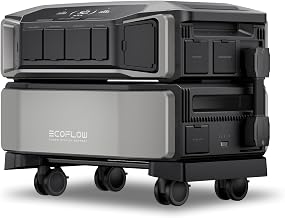
UPS Systems for Critical Equipment
If your outage risk centers on losing internet, losing refrigeration, or interrupting medical devices, a UPS is your first line of defense.
For internet and networking: A modest UPS (500–1000 VA) keeps your modem, router, and one computer running for 30–60 minutes. This buys time to alert utilities, contact family, or wait out a brief grid hiccup. 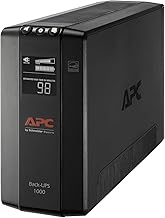
For medical equipment: Devices like CPAP machines, oxygen concentrators, or dialysis pumps demand continuous, clean power with zero switchover lag. A medical-grade UPS with pure sine-wave output is non-negotiable. 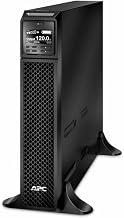
For home office and gaming: A 1500 VA UPS keeps your monitor, PC, and peripherals alive for 10–20 minutes, enough to save work and shut down gracefully. Per aggregated Amazon reviews, the 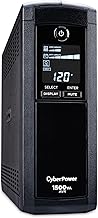
Whole-Home Battery Systems
If you want to forget about outages entirely, a hardwired battery system paired with solar panels offers true resilience—but at a higher cost and complexity.
Integrated all-in-one kits like Tesla Powerwall or LG Chem RESU handle the entire power conversion and switching automatically. When the grid fails, your home seamlessly switches to battery. Per manufacturer specs, Tesla Powerwall stores 13.5 kWh and can power a typical home for 24+ hours. Installation requires a licensed electrician and usually takes 1–2 days. Costs are premium-tier, but federal tax credits (currently 30% in the U.S., per IRS guidance) reduce out-of-pocket expense.
DIY LiFePO4 stacks offer flexibility at a lower cost. Components like 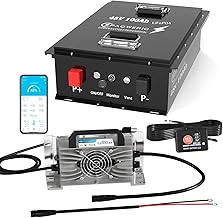
Battery Chemistry: LiFePO4 vs. Lithium-Ion vs. Lead-Acid
LiFePO4 (Lithium Iron Phosphate): The gold standard for backup power. Lifespan of 10+ years (often 5000+ charge cycles), excellent safety profile, and zero maintenance. Most modern portable power stations and home batteries use LiFePO4. Per manufacturer datasheets, LiFePO4 cells retain 80% capacity after 5000 cycles, far outlasting lithium-ion (typically 1000–2000 cycles). Cost is mid-to-premium tier, but per-cycle cost is lowest.
Lithium-Ion (NCM/NCA): Lighter and more compact than LiFePO4, but shorter lifespan (3–5 years typical) and higher fire risk if damaged. Common in budget and mid-tier portable power stations. Per teardown reviews, lithium-ion units degrade noticeably after 2 years of heavy use.
Lead-Acid (AGM or Flooded): Cheap upfront, but heavy, require ventilation, and last only 3–5 years. Rarely recommended for new installations.
For outage resilience, LiFePO4 is worth the premium. You’ll use it infrequently but intensely, and you want it to work when you need it most.
Charging Your Battery Backup
How you recharge your backup matters during extended outages.
Grid charging is the default: plug into a wall outlet when power is on. Most portable power stations charge in 2–8 hours, depending on capacity and charger wattage. Fast-charging models (like EcoFlow Delta Pro with 5.6 kW input) can fully recharge in under 2 hours, useful if you have brief windows of grid power.
Solar charging is the resilience multiplier. A portable power station with solar input can recharge indefinitely during an outage, as long as the sun is up. Under ideal conditions (clear skies, optimal panel angle, summer season), a 400 W solar panel array charges a 3 kWh station in 8–10 hours. Real-world charging times vary significantly based on weather, season, and panel orientation.
Car charging is an underrated option. Most portable power stations include a 12 V car charger. If you have a gas generator or access to a running vehicle, you can trickle-charge your backup. Not fast, but viable for extended outages.
Generator charging works if you own a portable generator. A 3000 W generator can charge a power station while also running other loads. Per manufacturer specs, this is more efficient than running everything directly off the generator.
Real-World Outage Scenarios
Scenario 1: Brief grid outage (under 4 hours) A portable power station in the 1–2 kWh range keeps your fridge (150 W average), lights (200 W combined), and internet router (15 W) running. At these loads, a 1.5 kWh station lasts roughly 6 hours. No solar needed; grid recharge when power returns. Budget-friendly and practical for most households.
Scenario 2: Extended storm outage (24–48 hours) A 3–5 kWh station plus 400 W of solar panels provides indefinite resilience if you’re disciplined about load management. Run the fridge (150 W, 24 hours = 3.6 kWh/day) during daylight hours and from battery at night. Charge from solar during the day. Many owners report this setup as the “Goldilocks” zone: expensive enough to be serious, affordable enough for middle-income households.
Scenario 3: Multi-day winter outage (no solar recharge) You need either a high-capacity battery (8+ kWh) or a backup generator. A gas or propane generator keeps your station charged while you live normally.
Scenario 4: Apartment dweller with no generator option A UPS for critical equipment plus a 2–3 kWh portable power station covers essentials. No installation required, silent, and complies with most lease terms.
FAQ
Q: How long does a portable power station last before I need to replace it? A: Most modern LiFePO4 power stations retain 80% capacity after 5–10 years of regular use, per manufacturer datasheets. Many owners report 8+ years of reliable daily use. Lithium-ion models typically degrade faster, showing noticeable loss after 3–5 years.
Q: Can I run my air conditioner on a portable power station? A: Most window AC units draw 3000–5000 W, requiring a very large power station (8+ kWh capacity) and an inverter rated for the peak surge. Per owner reports, it’s possible but impractical—your battery depletes in 2–4 hours. Better to use AC sparingly or rely on a generator for cooling during extended outages.
Q: Do I need a whole-home battery system, or will a portable power station suffice? A: It depends on your outage frequency and risk tolerance. Portable stations (1–5 kWh) handle most household outages lasting under 24 hours. Whole-home systems (10+ kWh, often with solar) are for people in areas with frequent long outages or those seeking true energy independence.
Q: What’s the difference between a UPS and a power station? A: A UPS is designed for instant switchover (milliseconds) and brief runtime (5–60 minutes), ideal for computers and medical devices. A power station runs for hours or days and requires manual connection, but costs less and stores more energy. Use both: UPS for critical equipment, power station for whole-home backup.
Q: Can I leave my power station plugged in all the time? A: Yes. Modern LiFePO4 power stations have smart charging circuits that stop charging at 100% and trickle-charge to maintain the battery. Per manufacturer guidance, keeping a station at 80–90% charge during storage extends lifespan. Leaving it fully charged for months can reduce overall battery life slightly.

