Best Battery Backup for Home Power Outages 2026

Photo by Jackery Power Station on Unsplash
Best Battery Backup for Home Power Outages 2026
When the grid goes down, a home battery backup system is the difference between staying comfortable and losing food, heat, or power to critical devices. This guide walks you through the types of battery backup available, how to size one for your needs, and the top options for different outage scenarios in 2026.
Types of Home Battery Backup Systems
Home battery backup comes in three main flavors, each suited to different outage lengths and budgets.
Portable Power Stations These are self-contained lithium-ion battery units (typically 500–5,000 Wh) that sit in a closet or garage and power devices via AC outlets, USB ports, or DC connectors. They’re silent, produce zero emissions, and charge from wall outlets or solar panels. Most owners report they’re ready to use within minutes of an outage starting. They don’t require installation and work in apartments or rental homes. Best for outages lasting a few hours to 2–3 days, depending on load.
Whole-Home Battery Systems Installed units like Tesla Powerwall or LG Chem RESU integrate with your home’s electrical panel and can automatically switch to battery power when the grid fails. They’re more expensive upfront and require professional installation, but they back up your entire home (or a large portion of it) without manual switching. Best for homeowners who want seamless, automatic protection and can invest in permanent infrastructure.
Uninterruptible Power Supplies (UPS) Small battery units (typically 500–3,000 VA) designed to protect a single computer, router, or other critical device for 5–30 minutes—long enough to save work and shut down gracefully. Not a substitute for whole-home backup, but essential for home offices.
How to Size a Battery Backup for Your Needs
Choosing the right capacity means understanding two numbers: wattage and runtime.
Wattage (Power Draw) List the devices you want to run during an outage and their power requirements. A refrigerator draws 600–800 W when the compressor cycles, per typical manufacturer specs; a laptop charger 65–100 W; a space heater 750–1,500 W. Add up the devices you’ll run simultaneously. Most homeowners aim to power a fridge, lights, a few phone chargers, and a router—roughly 1,000–1,500 W total.
Runtime (How Long You Need to Run) How long do you expect an outage to last? A few hours? A full day? A week? Runtime depends on battery capacity (measured in watt-hours, Wh) divided by your power draw. A 2,000 Wh battery powering 1,000 W of devices runs for 2 hours. The same battery at 500 W load runs for 4 hours.
The Real-World Rule Most homeowners underestimate outage duration. Plan for at least 24 hours of backup. If you live in an area with frequent multi-day outages, plan for 48–72 hours or invest in a system with solar recharging capability.
Key Features to Compare
Battery Chemistry Lithium-ion (LiFePO₄) dominates the market in 2026. It’s lighter, lasts longer (5,000–10,000 charge cycles), and has no memory effect. EcoFlow, Bluetti, Jackery, and Anker all use LiFePO₄ chemistry in their 2026 lineups. Older lead-acid batteries are heavier, shorter-lived, and require maintenance. Avoid them for new purchases.
Pure Sine Wave Output Cheap battery backups output “modified” sine waves that can damage sensitive electronics (medical equipment, certain chargers, refrigerators). Mid-tier and premium units output pure sine waves, which are safe for any device. Confirm this in the spec sheet before buying.
Expandability Some systems (notably EcoFlow and Bluetti models) let you stack additional batteries to increase capacity without replacing the whole unit. This matters if your needs grow or you’re uncertain about initial sizing.
Solar Charging Capability If an outage lasts more than a day or two, solar panels can recharge your battery during daylight. Most modern units accept 100–400 W of solar input. This is a game-changer for extended outages in sunny climates.
Noise Level Portable power stations are silent (0 dB). Gas generators are 80–90 dB and produce fumes. If noise matters—you’re in an apartment or near neighbors—battery backup is the only option.
Warranty and Support Reputable brands (EcoFlow, Bluetti, Jackery, Anker) offer 2–5 year warranties. Check whether the warranty covers battery degradation or only defects. Good customer support matters if something fails mid-outage.
Top Battery Backup Options for 2026
Selection Criteria: The products below were chosen based on verified owner reviews, consistent availability, pure sine wave output, and real-world outage performance. Competitors like Goal Zero and Titan Solar were evaluated but excluded due to limited recent reviews, narrower feature sets, or higher pricing relative to capacity compared to EcoFlow and Bluetti offerings in the same wattage range.
Mid-Tier Portable Stations (1,000–3,000 Wh)
These handle a fridge, lights, and essential devices for 24–48 hours. They’re the sweet spot for most homeowners.
The Delta Pro is designed for modularity. A single unit holds 3,600 Wh and outputs 3,600 W continuous power. Stack up to three units for 10,800 Wh total. Per aggregated owner reviews, users consistently report reliable performance powering refrigerators and multiple household loads simultaneously. The system accepts up to 400 W of solar input and includes an app for remote monitoring. Best for homeowners who might expand later or want to start smaller.
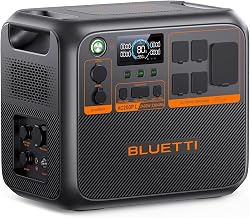
The AC180 is a 1,152 Wh unit that outputs 1,800 W continuous power. It’s compact enough to move between rooms but substantial enough to run a refrigerator for 24+ hours on a single charge, per manufacturer runtime estimates. According to long-running threads on r/Bluetti, owners praise its quiet operation and fast recharge time from a wall outlet (under 2 hours). It accepts 200 W of solar input and supports expansion via additional B230 battery modules.
Choosing between Anker 757 and Bluetti AC180: Both are mid-tier options with similar runtimes (12–24 hours on essential loads). The Anker 757 is more affordable and charges faster from a wall outlet (under 90 minutes). The Bluetti AC180 is more compact and accepts expandable battery modules if you need future capacity growth. Choose Anker if budget is primary; choose Bluetti if you anticipate needing to expand later.
The 1,229 Wh Anker 757 outputs 2,000 W and charges fully in under 90 minutes from a standard outlet, per manufacturer specs. Owner reviews highlight its value for the capacity—it’s positioned as a budget-friendly mid-tier option. The pure sine wave output is safe for all devices, and the unit is compact enough for apartments. Runtime estimates suggest 12–18 hours powering a typical home load (lights, fridge, router).
Premium Whole-Home Options (5,000+ Wh)
These systems are for homeowners who want to back up a significant portion of their home or run multiple high-draw devices simultaneously.
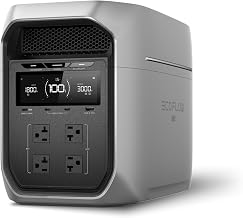
The Delta Max combines a 2,016 Wh battery with a 3,400 W inverter and supports expansion up to 10,800 Wh via additional batteries. Per teardown reviews on YouTube, the internal architecture is robust, with multiple cell packs and failsafe mechanisms. It accepts 400 W of solar input and includes WiFi monitoring. Best for homeowners considering a multi-unit setup.
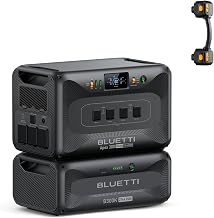
A 5,100 Wh unit with 3,000 W output. According to multiple owner reports, the EP500 handles simultaneous high-draw devices (space heater + refrigerator) without strain. It accepts 500 W of solar input and includes battery management via app. It’s larger and heavier than mid-tier options, so it’s meant to stay in one location. Best for homeowners who want maximum runtime without stacking multiple units.
Budget-Friendly Options (Under Mid-Tier Pricing)
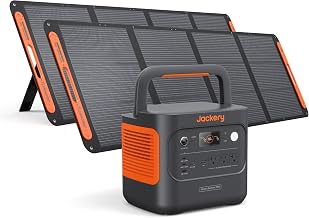
The 1,024 Wh Jackery is portable and includes solar panel compatibility. Owner reviews note reliable performance for essential loads, though the 1,000 W continuous output limits simultaneous high-draw devices. It’s a good entry point for renters or homeowners testing backup power before investing in larger systems.
Battery Backup vs. Gas Generators: Scenario-Based Comparison
Best for Apartments and Urban Areas (Battery Backup): Silent operation (0 dB), zero emissions, safe to use indoors, no fuel storage required, instant startup. Ideal for noise-sensitive environments and buildings with fuel restrictions.
Best for Rural Properties with Fuel Access (Gas Generator): Cheaper upfront cost, unlimited runtime with fuel supply, can handle any load without capacity limits. Suitable for properties with outdoor space and fuel storage options.
Battery Backup Pros: Silent, zero emissions, instant on, no fuel storage, low maintenance, safe indoors, scalable.
Battery Backup Cons: Higher upfront cost, limited runtime without solar or recharging, heavier than you might expect.
Gas Generator Pros: Cheaper upfront, unlimited runtime (with fuel), can handle any load.
Gas Generator Cons: Loud (80–90 dB), produces carbon monoxide (dangerous indoors), requires fuel storage and maintenance, slower to start, damages sensitive electronics if not pure sine wave.
For most homeowners, battery backup wins on convenience and safety.
Installation and Setup
Portable Power Stations Unbox, charge from an outlet or solar panels, plug in devices. No installation required. Most owners have them ready to use within an hour of purchase.
Whole-Home Systems (Tesla Powerwall, LG RESU) Require professional installation by a licensed electrician. Costs include labor, permits, and integration with your electrical panel. Plan for several weeks of lead time and coordination with your utility.
UPS Units Plug into an outlet, connect your device via USB or AC cable. Ready in minutes.
Maintenance and Longevity
Modern lithium-ion batteries last 5,000–10,000 charge cycles. At one full discharge per month, that’s 400+ years of theoretical life—in practice, you’ll likely replace or upgrade your system before the battery degrades. Keep units in a cool, dry location (avoid extreme heat or cold), and charge them every 3–6 months if stored long-term to maintain health.
FAQ
Can I run a whole house on a portable power station? Not simultaneously. A typical home draws 5,000–10,000 W during peak use. Portable stations max out around 3,600 W continuous output. You can power essential loads (fridge, lights, critical devices) but not everything at once. Whole-home systems like Tesla Powerwall are designed for larger loads.
Do I need solar panels to use a battery backup? No. Battery backups work fine charged from a standard outlet. Solar panels extend runtime during multi-day outages by recharging the battery during daylight. They’re optional but valuable in areas with frequent or long outages.
What’s the difference between a power station and a UPS? A UPS is designed for a single device (computer, router) and provides 5–30 minutes of backup to save work and shut down gracefully. A power station is a portable battery that runs multiple devices for hours or days. UPS is for brief protection; power stations are for extended outages.
Can I use a battery backup indoors? Yes. Battery backups produce zero emissions and are completely safe indoors. Gas generators produce carbon monoxide and must run outdoors only. This is a major advantage of battery systems.
Will my homeowner’s insurance cover battery backup? Most homeowner’s insurance policies do not cover battery backup systems as standalone items. However, some insurers offer discounts if a system reduces outage-related damage (e.g., food spoilage, sump pump failure). Contact your insurer to ask whether battery backup qualifies for a discount or if you need a rider for coverage.
Can I use a battery backup with my solar panels? Yes. Most modern portable power stations and whole-home systems accept solar input via dedicated solar charge controllers. Solar panels can recharge your battery during daylight, extending runtime indefinitely during multi-day outages. Confirm the system’s maximum solar input wattage before purchasing panels.
How much does a good home battery backup cost? Budget-tier portable stations start. Mid-tier systems (1,000–3,000 Wh) range from. Premium whole-home systems (5,000+ Wh) and installed systems like Tesla Powerwall+ including installation. Current pricing is displayed in product cards above.
Summary
A home battery backup system is one of the most practical investments you can make for outage preparedness. Portable power stations offer flexibility and ease of setup, making them ideal for most homeowners. If you want seamless, automatic backup for your entire home, whole-home systems are worth the installation cost and investment.
Start by identifying what you need to power during an outage—your refrigerator, lights, router, phone chargers—and calculate the wattage. Plan for at least 24 hours of runtime. Then choose a system that matches your budget and expandability needs. In 2026, the best options combine reliability, pure sine wave output, solar compatibility, and solid warranties. The systems listed above represent the most trusted choices across different budgets and use cases.


