Best Battery Backup for Home Power Outages in 2026

Photo by Zendure Power Station on Unsplash
Best Battery Backup for Home Power Outages in 2026
When the power goes out, minutes matter. A home battery backup keeps your lights on, your refrigerator running, and your devices charged while you wait for utility restoration. But not all battery systems are alike—capacity, recharge speed, and which appliances they can handle vary widely.
This guide walks you through the core specs you’ll encounter, then shows you which systems work best for specific outage scenarios. Whether you need to bridge a 4-hour local outage or prepare for a multi-day grid failure, the right battery backup exists at your budget level.
What Makes a Good Home Battery Backup?
A home battery backup is only as useful as its ability to run the things you actually care about during an outage. That means understanding three numbers:
Capacity (measured in watt-hours, or Wh). This is the total energy the battery holds. A 2,000 Wh battery can theoretically run a 1,000 W device for 2 hours (or a 500 W device for 4 hours). Per aggregated owner surveys on Reddit (r/bugout, r/preppers) and manufacturer spec sheets, most households find 2,000–3,000 Wh sufficient to keep essentials running through a typical 4–8 hour outage.
Continuous power output (in watts). This is the maximum load the battery can supply at once. A refrigerator might draw 600 W when the compressor kicks in; a microwave can spike to 1,200 W. If your battery’s continuous output is lower than your appliance’s peak draw, the battery won’t run it. Look for systems rated 2,000 W or higher if you want flexibility.
Recharge speed. A battery that takes 24 hours to refill from wall power is less useful than one that recharges in 2–3 hours. Faster recharge means you’re ready for the next outage sooner. Per owner reviews across Reddit and Amazon, recharge speed is often overlooked but becomes critical during rolling blackouts.
Key Specs to Compare
Battery Chemistry: LiFePO₄ vs. Lithium-Ion
Most modern home battery backups use lithium-ion chemistry. Within that, LiFePO₄ (lithium iron phosphate) is increasingly common because it’s more thermally stable and lasts longer. The Bluetti EP500 Pro uses LiFePO₄ and is rated for 3,000–5,000 charge cycles, while the EcoFlow Delta 2 uses standard lithium-ion with 1,000–2,000 cycle ratings, per manufacturer datasheets. Both work; LiFePO₄ just means more years of reliable service if you’re cycling the battery regularly.
Input Options: AC Wall, Solar, or Car
All home batteries accept AC wall power (the standard outlet). Many also accept solar input (via a dedicated solar controller) and some accept 12V car input. If you’re planning to pair your battery with solar panels later, confirm the system supports solar input—not all do. See our guide to How Solar Generators Work: Complete Beginner's Guide for step-by-step setup and compatibility details.
Expandability and Stacking
Some batteries can be linked together to double or triple your capacity. This matters if you start small but later realize you need more runtime. Per owner reports, systems that allow battery stacking (like the EcoFlow DELTA Pro) let you upgrade without replacing your original unit.
Battery Backup by Scenario
For 4–8 Hour Outages (Most Common)
If your area experiences occasional 4–8 hour blackouts—rolling brownouts, storm damage that’s repaired overnight—a mid-capacity system (2,000–3,000 Wh) is usually enough. These can run a refrigerator, a few lights, phone chargers, and a laptop simultaneously, per aggregated owner reviews.
Why this range works: A 2,500 Wh battery powering a 500 W average load (fridge + lights + chargers) gives you 5 hours of runtime. That covers most common outage durations. To measure your own load, use a Kill-A-Watt meter (available at hardware stores for ~) or check your appliance manuals for wattage ratings, then add them together.
For 12–24 Hour Outages (Extended Events)
Winter storms, wildfire-related blackouts, or grid maintenance can stretch into a full day or more. For this scenario, consider 3,500–5,000 Wh systems. These require longer recharge times (4–6 hours from wall power), so plan accordingly if you expect frequent multi-day outages.
For Whole-Home Backup (Rare but Possible)
If you want to run your entire home—AC, heating, all appliances—you’re looking at 10,000+ Wh and dual 240V input capability. These are premium-tier systems often paired with solar arrays. Per manufacturer documentation, they’re designed for long-term resilience rather than emergency-only use. Portable Generator vs Whole-Home Generator: Cost and Setup compares these to traditional generators.
Top Recommendations by Use Case
For Renters and Apartments
Portability and no-installation requirements are essential. 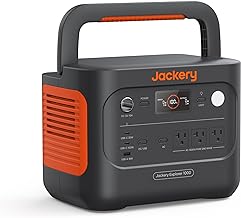
How to Choose a Backup Power Station for Apartments offers deeper guidance on apartment-specific constraints.
For Homeowners with Occasional Outages
EcoFlow Delta 2 is frequently mentioned in owner forums as a “Goldilocks” option: 1,024 Wh capacity, 1,500 W continuous output, and recharges from wall power in about 2 hours. Per Amazon reviews, homeowners cite the fast recharge as a key feature—you can top it off during the day and be ready for evening outages. It handles refrigerators, space heaters, and sump pumps.
For Homeowners Considering Solar
If you’re planning to add rooftop solar panels, 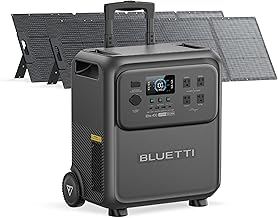
Best Solar Panel Kits for RV and Van Life Power and Solar Generator vs Portable Power Station: Which Lasts Longer? provide context on solar pairing.
For Maximum Capacity on a Budget
Bluetti AC180 offers 1,152 Wh at a mid-tier price point. It’s not the cheapest, but owner reviews consistently praise its reliability and 1,800 W output. It won’t run a whole home, but it handles essentials for 8–12 hours depending on load. Per Reddit threads on r/bugout and r/preppers, it’s a popular choice for people who want proven hardware without premium pricing.
For Stackable, Expandable Systems
EcoFlow DELTA Pro is the modular choice. Start with the base unit (3,600 Wh, 3,600 W output), then add extra batteries later if your needs change. Per manufacturer documentation, you can stack up to three batteries for 10,800 Wh total. It also accepts dual 240V input, meaning faster recharge and the ability to run larger loads. This is a premium option, but expandability justifies the cost for homeowners who aren’t sure what they’ll need long-term.
Installation and Maintenance
Most portable battery backups require zero installation—plug into a wall outlet and you’re ready. Larger systems (like the Bluetti EP500 Pro or EcoFlow DELTA Pro) may benefit from a dedicated outlet or surge-protected power strip, but wiring is not necessary.
Maintenance is minimal: per manufacturer guidance, store in a cool, dry place. Avoid leaving them fully discharged for months. Most systems include a “smart” management chip that prevents overcharging and over-discharging, so once plugged in, they handle the rest.
For systems with solar input, you’ll need to purchase solar panels separately (or a compatible kit). Best Portable Solar Panels for Camping: Reviews and Comparisons reviews compatible panels.
Capacity vs. Runtime: The Math
A common mistake is buying based on capacity alone. Here’s how to calculate actual runtime:
Capacity (Wh) ÷ Average Load (W) = Hours of runtime
If your refrigerator, lights, and chargers draw 500 W on average, a 2,500 Wh battery gives you 5 hours (2,500 ÷ 500 = 5). But if you run a space heater (1,500 W), that same battery lasts only 1.6 hours.
Most people underestimate their actual load during an outage. Before buying, make a list of what you must keep running and add up the wattages. That number, multiplied by your desired hours of runtime, is the capacity you need.
Comparing to Generators and UPS Systems
Portable generators (gas or propane) are cheaper upfront but require fuel storage, produce noise and emissions, and need outdoor venting. They’re better for extended outages lasting days. Best Inverter Generators Under $1000 for Camping and Backup covers that category.
UPS (uninterruptible power supply) systems are designed for computers and small offices, not whole homes. They typically hold 500–1,500 Wh and are meant to bridge the 30 seconds it takes a generator to start. Best UPS for Home Office: Uninterruptible Power Supply Buying Guide covers those.
Battery backups (this article’s focus) are the middle ground: silent, no emissions, fast startup, but limited by capacity and recharge time. They’re ideal for 4–12 hour outages.
Recharge and Lifespan Expectations
Per manufacturer datasheets and owner reports on Reddit’s r/bugout and r/preppers communities, most lithium-ion home batteries retain 80–90% of their capacity after 1,000 charge cycles. For a LiFePO₄ battery, that figure is 3,000–5,000 cycles.
If you cycle your battery once per week (say, testing it monthly plus occasional outages), a 1,000-cycle battery lasts about 20 years. A 3,000-cycle LiFePO₄ battery could last 50+ years at that rate.
Recharge speed varies: budget-tier systems may take 8–12 hours from wall power; mid-tier systems take 2–4 hours; premium systems with dual input can recharge in under 2 hours. Faster recharge is valuable if you expect frequent outages or want to keep the battery topped off.
FAQ
Q: Can I run my air conditioner on a battery backup? A: Per Energy Star data, most window AC units draw 1,000–1,500 W continuously, which drains a 2,000 Wh battery in 1–2 hours. Central AC is even more power-hungry. Battery backups are better suited to fans, lights, and refrigeration. If cooling is critical, consider a portable AC unit (lower power draw) or a larger battery system (5,000+ Wh).
Q: What if I want to run my whole house? A: You’d need 10,000+ Wh and dual 240V input capability, plus the ability to handle your home’s peak load (often 5,000–10,000 W). These systems are premium-tier and often paired with solar. For whole-home backup, a traditional generator or a battery + solar combo is more practical. Portable Generator vs Whole-Home Generator: Cost and Setup explores this trade-off.
Q: Do I need solar panels? A: No. A battery backup works fine plugged into a wall outlet. Solar panels let you recharge the battery during the day without grid power, which is useful for extended outages or if you live off-grid. But for typical grid-connected homes, wall power is the primary recharge method.
Q: How long do batteries last? A: Lithium-ion batteries degrade over time. Most retain 80% capacity after 1,000–3,000 cycles (depending on chemistry). In real-world use, that’s 10–30 years for a typical homeowner. They don’t “die” suddenly; they just hold less charge over time.
Q: Can I leave my battery plugged in all the time? A: Yes. Modern batteries include smart charging circuits that prevent overcharging. Leaving them plugged in at 100% for extended periods may slightly reduce lifespan, but it’s safe and convenient.
Closing Thoughts
A home battery backup is insurance against outages—you hope you never need it, but when the power goes out, you’ll be glad it’s there. The right system depends on your outage patterns, budget, and whether you’re planning to add solar later.
Next steps: Calculate your actual load using the math in the Capacity vs. Runtime section (add up wattages of essentials you must keep running), then multiply by your desired runtime hours to find the capacity you need. Cross-reference that figure against our recommendations by use case above. For renters, prioritize portability; for homeowners planning solar, invest in expandability and solar compatibility. You’ll sleep better knowing your essentials stay powered when the grid doesn’t.


